INtro to simplemind pro
SimpleMind Pro facts:
One-time fee per software platform. Has versions for Windows, Mac, IOS, Android.
A single user can use on multiple personal machines of the same operating system.
Free thirty day trial.
Have helpful tutorials, articles on use and features, and a Youtube channel.
However, they do not have a downloadable manual.
This is similar to Scapple from Literature and Latte, but possesses more features and customizations
I have no affliation, nor recieve financial support from Simplemind Pro
Program Features include:
Intuitive Mind Mapping
Easily add topics, reorganize and restructure
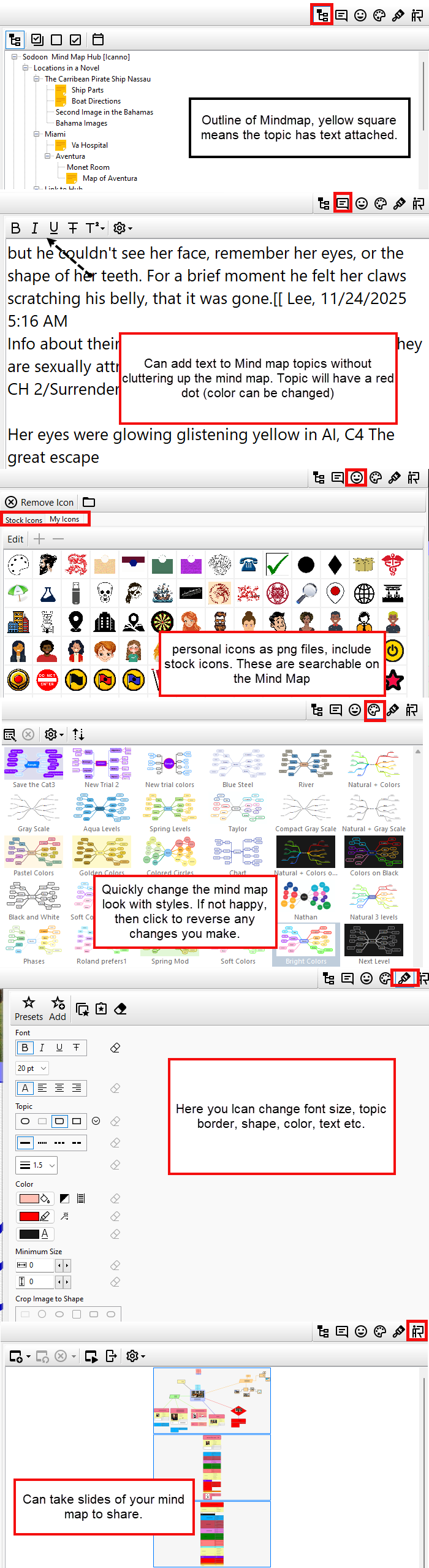
Topics can hide text in the Inspector similar to Scrivener’s Document Notes in its Inspector. A Topic with text included has a dot in the upper right Topic Corner. The color dot appears inside the Topic border and you can change the color. This allows a cleaner interface with the ability to display large amounts of text when needed.
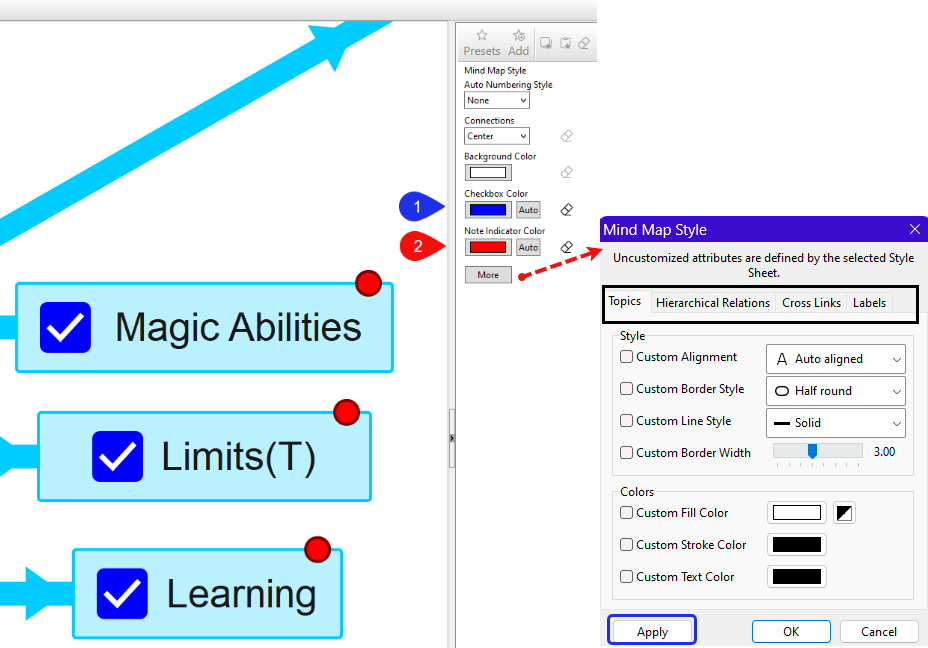
****The Note Indicator is a circle in the upper right corner of a note to indicate the Topic contains a Note (text). The default option is the color of the circle matches the color of the underlying Topic.
However, this can be changed by using the Menu command Style > Mind Map Style > which opens the Format Panel of the Inspector.
Here you can change multiple elements including checkbox and note indicator dot color. (see below)
Click the More box to have more options to change for the mind map style
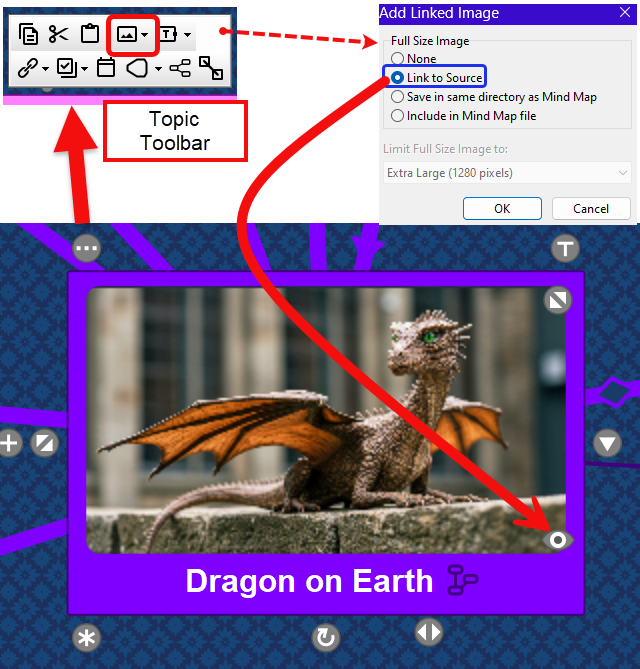
An Image preview can be included in a Topic or attached to a Topic. You can set the size of the full image you will display as well. If you click on the … icon in the upper left corner, this opens a Topic Toolbar. Choose the picture icon > Add Linked image in Topic. Will see a menu below and click the option of Link to Source. This will embed an image with an eye icon which will enlarge the embedded image if clicked.
You can add Icons to Topics to help identify them and they are searchable.
You have the option of Free-form layout (where notes can be freely placed) or auto layouts where new notes/topics are added by preset rules.
(There are distinct seven auto-layouts included.)
Sharing
Share your mind map. Export options include a Simplemind Pro mindmap (.smmx file), a PDF, an outline, image, or a zipped HTML file to a website (The method to upload will vary by site you are attempting to load the file too).
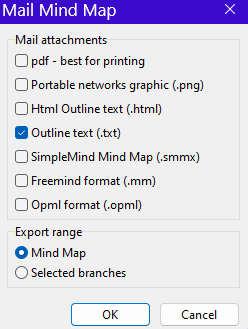
You can email the mindmap as a pdf, Simplemind Pro mindmap, image, or outline. (see below) You can even choose to only email a portion of the mindmap as well. You can take multiple sample slide images from your Simplemind project as well.
Hyperlinking
This allows links to documents, webpages, computer files, but even hyperlinking within the mindmap itself to other areas of the mindmap. You could create hyperlink link hubs to speed navigation to widespread areas within a sprawling mindmap.
Customatization:
Use one of the 15+ style sheets
Create your own style sheets
Style details can include borders, lines, colors, and text all of which can be modified within an Inspector interface which can be visible or hidden.
The Inspector
Possesses an Inspector which allows you to view a Mind Map in an outline format, see hidden text notes for an individual Topic (Mindmap node), add searchable default, or imported custom Icons, apply styles (system wide) which dramatically change to appearance of your mindmap with a single click, a formatting area to change the color, shape, text color, note connections, or label appearance, and a slide show function which allows to save images of various parts of your Mind Map.
Overview
An Overview option shows a minimap of your Mindmap allowing a rapid movement across even very large mindmaps to note clusters.
Mindmap Search
A robust Search option allowing searching by words either in the Topic or any of a Topic’s text in the Inspector, by Icons embedded in a topic, dates (if added) and checkbox status (if added)
Flexible Topic Appearance
The ability to combine various Layout styles on one Mindmap using different central theme starting points.
Topics can have eleven different Shapes, and 4 different style borders.
They have a toolbar when click on the … icon in the upper left of a Topic to access various options and functions for notes. (see Topic Toolbar)
Topics can easily be resized and the font changed. You can change their shape and border. Hold the Ctrl key and use the mouse to marquee select multiple Topics at once to change styles.
Topics can have images embedded inside them or along side them as discussed above.
Your mouse can marquee multiple Topics and move them as a unit preserving their relationships and distant to each other.
Mindmap branches can be hidden as needed.
Topic associations can easily be changed.
Labels- You can attach comments to Topics or Connections themselves.
The Inspector
This functions like Scrivener’s Inspector in that you can customize the mind map inside its options, add text, display an outline of the mindmap and its notes, create a slide show and more.
Connections (Enhanced flexibility)
Connections between Topics can have labels which can have the font size varied, color adjusted, and the label can be on the connection or dragged off to the side.
You can have four different types of Connections, different line styles, color, thickness, and arrow directions. You can create your own personal styles. (Some examples below.)
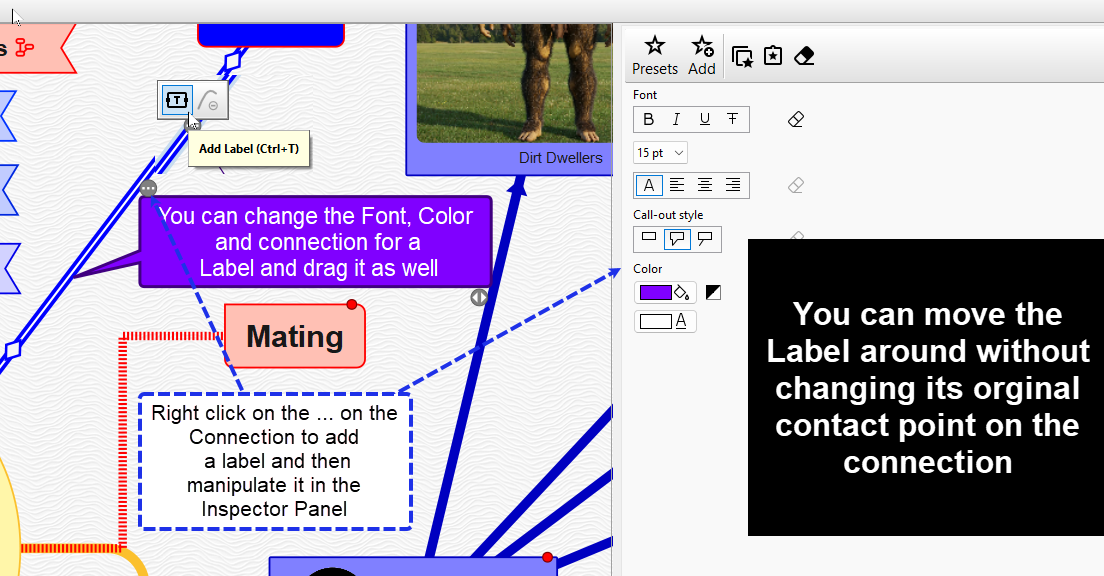
Labels
Topics can have labels added as well. Labels have a number of preset styles and you can create your own. (see above)
Hyperlinks
Hyperlinks to the web, program files or to Topics within one Mindmap. This allows you to quickly jump from one Topic to another no matter its location on a mindmap. You could even create link hubs to jump to various areas of a Mindmap and quickly return. However, links are only one way, rather than two way.
Templates
You can create templates to use for work flows, or novel writing to use again and again. These can include elements which can be copied into other mindmaps.
This introduction is not designed to teach you Simplemind Pro, but to whet your appetite to give the free 30 day trial a whirl.